 01 / 04
1–4 playersComputer playersLeaderboard34 custom props
Table game
Quicks
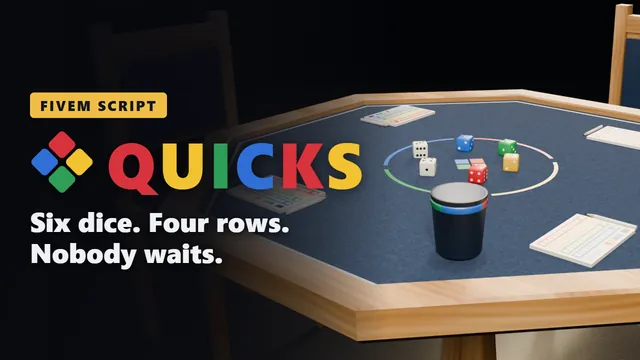
The quick dice game with six dice and a sheet of four coloured rows, for 1–4 players. Every throw is for everyone at the table, so nobody sits and waits for their turn.
- Granted to your Cfx.re account after payment
- Asset escrow, with the config left open
- Support on Discord
What you get
Quicks, in detail
The game
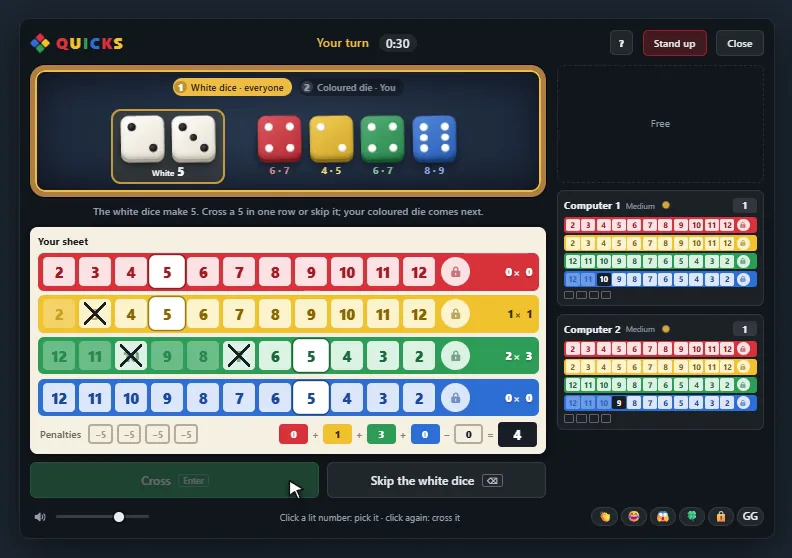
- A sheet of four rows: red and yellow run from 2 to 12, green and blue from 12 down to 2. A row is crossed from left to right.
- The white dice count for everyone: all players decide at the same time.
- The thrower may add a white die to a coloured one for a second cross.
- Lock a row with its last number and its die leaves the game. Two locked rows end it.
The board
- The numbers the dice let you cross light up; the ones you would pass by for good fade as soon as you pick.
- Under each coloured die stands what it makes with either white die.
- Your sheet is the large one, the others' sheets sit beside it.
- The ? explains the game in seven sentences.
In the world
- Custom eight-sided table, chairs, a dice cup, score sheets and dice in five colours.
- Everyone nearby sees the dice on the table.
- A camera over the table for seated players.
- Admins place tables in game with a command.
Fair play
- The dice are thrown and every cross is judged on the server.
- A time per step, chosen in the lobby. When it runs out, the dice are thrown for the player.
- Optional stake; in a tie, all tied players share the pot.
- Records and a leaderboard through oxmysql.
Before you buy
What it needs
No dependencies. Used when they are running: ESX, QBCore or Qbox for character names and the stake, oxmysql for records and the leaderboard, ox_target for sitting down and watching.
- Scripts and models are protected by the FiveM asset escrow. The config and the texts stay open.
- Your server has to run with a license key from the Cfx.re account that owns the resource.
- Exports for your own scripts, in files that are left open as well.
Set up
On your server in three steps
Download
From the Cfx.re Portal, under Granted Assets.
Ensure
Put the folder into your resources and add it to your server.cfg.
Configure
Everything is explained option by option in the documentation.
More from the store
Keep browsing